Tags
Tag list
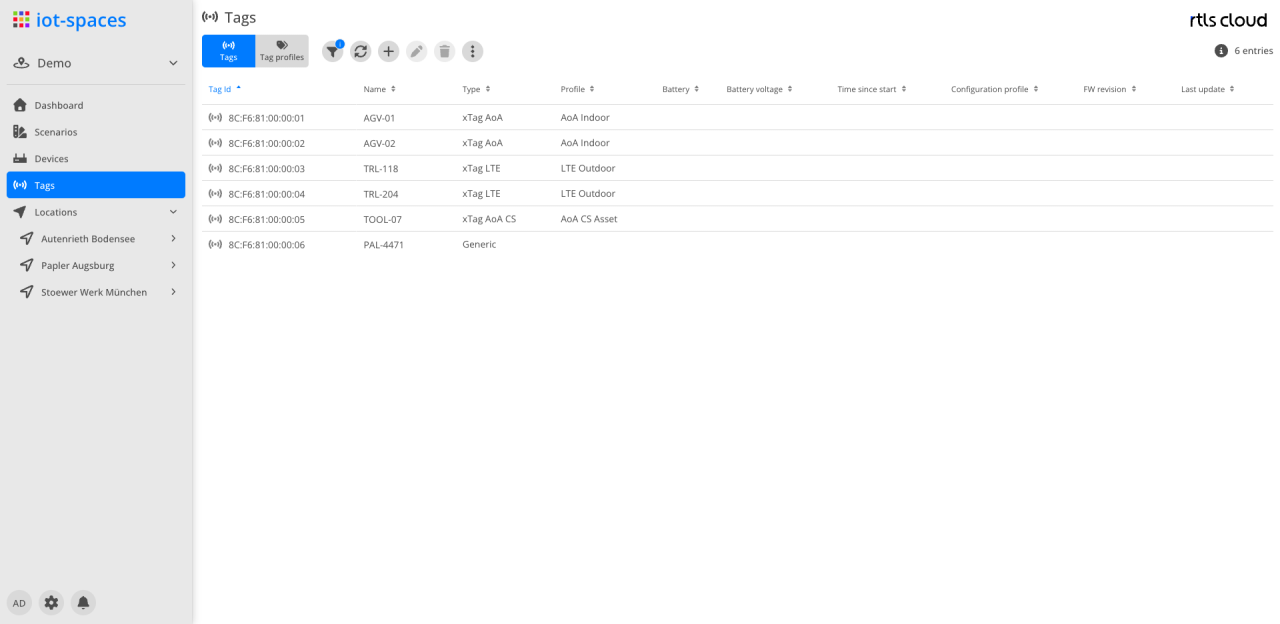
| Module | Description |
|---|---|
Filter |
Filter by tag properties and labels; the Own tags only option shows just the tags of this view, see Which tags can be deleted here |
|
Refreshes the tag list |
|
Create a new tag |
|
Edit the selected tag |
|
Delete the selected tag; not possible for shared tags, see Which tags can be deleted here |
Actions |
Further actions to choose from, among them the export of the list |


Actions in the context menu
The tag actions are in the context menu of the respective row and act on the selection:
| Action | Effect |
|---|---|
Assign tag profile |
Assigns a profile from the Tag profiles perspective to the selected tags |
Assign labels |
Sets the labels of the selected tags |
Activate / deactivate tag(s) |
Switches the tags active or inactive |
Debug |
Switches the tag’s debug feature on or off |
Trace |
Switches tracing within the debug feature on or off |
Decision |
Switches the recording of decisions within the debug feature on or off |
The tag type can only be changed with administration permission on the tenant.
Columns
| Field | Type | Description |
|---|---|---|
Tag Id |
Text |
Unique ID of the tag; the leading icon shows the state of the tag |
Name |
Text |
Name of the tag |
Type |
Text |
Tag type; the types are described under Types |
Profile |
Text |
Assigned tag profile |
Battery |
Icon |
Charge level of the battery |
Voltage |
Number |
Battery voltage |
Time since start |
Duration |
Uptime since the tag was last started |
Configuration profile |
Text |
Assigned configuration profile |
FW revision |
Text |
Firmware version of the tag |
Last update |
Timestamp |
Point in time of the tag’s last report |
Which tags can be deleted here
The list deliberately shows more than the tags of this space. Added to them are the ones provided by the platform and the ones released for all spaces of the tenant.
Only the space’s own tags are deleted here, and those only with the corresponding permission. A shared tag belongs to more than one space; deleting it from here would reach past this space, and that is not possible regardless of the user’s permissions. Shared tags are deleted only where they are managed — in Tags in the tenant administration.
Which tags those are in a given case is what the filter answers: the Own tags only option — in the filter below FW Revision, off by default — hides everything the view does not own. What remains is exactly the set that can be deleted here. In the tenant administration the same option applies to the tenant and hides the platform’s tags.
| The difference can be large. On a tenant with many provided tags, a few hundred come down to a handful of its own — switching it on once says more than any description. |
If a selection contains shared tags, a dialog says so before anything is deleted:
-
If all selected tags are shared, nothing is deleted: Deletion not possible — These entries are shared and are managed in the tenant administration. They cannot be deleted here.
-
If the selection is mixed, the dialog states the split — "3 of 5 selected entries will be deleted. 2 of them are shared and are managed in the tenant administration." — and reports after the confirmation what was actually deleted.
The same dialog appears when a selected tag cannot be deleted for another reason; it then names the missing permission instead of the sharing.