Audit events
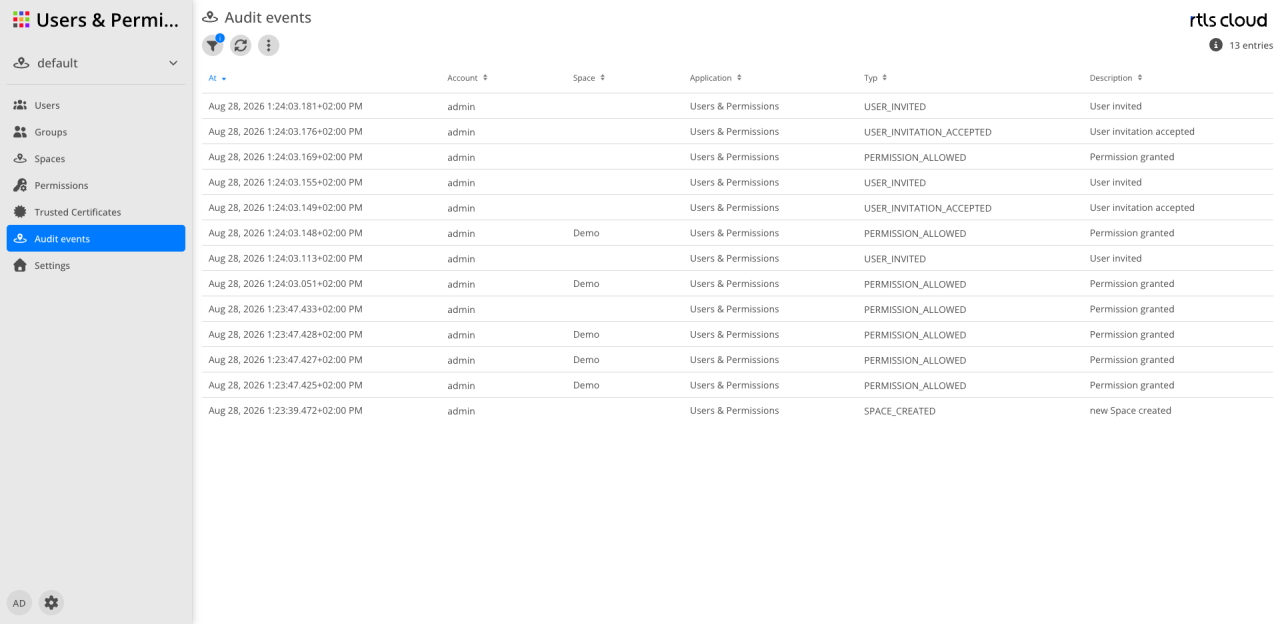
The events
This view shows only events concerning the tenant you are signed in to. What is recorded beyond that is listed under Events only the operator sees.
| Type | Meaning | Source |
|---|---|---|
Invitations |
||
|
An invitation was sent. |
Users & Permissions |
|
An invitation was accepted. |
Users & Permissions |
|
An invitation was declined. |
Users & Permissions |
|
An invitation was revoked. |
Users & Permissions |
Groups |
||
|
A group was created. |
Users & Permissions |
|
A group was edited. |
Users & Permissions |
|
A group was deleted. |
Users & Permissions |
Permissions |
||
|
A permission entry was added. The event occurs when a permission is granted, not on every access. |
Users & Permissions |
|
An entry was added that explicitly denies a permission. |
Users & Permissions |
|
A permission entry was removed, or an object’s permissions were deleted altogether. |
Users & Permissions |
Spaces |
||
|
A space was created. |
Users & Permissions |
|
A space was edited. |
Users & Permissions |
|
A space was deleted. |
Users & Permissions |
Certificates |
||
|
A trusted certificate was added. |
Users & Permissions |
|
A certificate was edited. |
Users & Permissions |
|
A certificate was deleted. |
Users & Permissions |
Export and applications |
||
|
Data was exported. The event carries the format, the file name and the kind of data. |
every application |
|
A tag was assigned to an asset. |
Tracking |
|
The assignment was removed. |
Tracking |
Events only the operator sees
The following operations are recorded as well, but carry no tenant — not even when they concern users of your own tenant. They therefore do not appear in this view. Whoever needs them, for evidence about sign-ins for instance, requests them from the operator of the installation.
| Type | Meaning | Source |
|---|---|---|
Sign-in and session |
||
|
A sign-in succeeded. |
Platform |
|
A sign-in failed. |
Platform |
|
A user signed out. |
Platform |
|
Access was denied. Attempts by callers who are not signed in are not recorded. |
Platform |
Users |
||
|
A user account was created. |
Users & Permissions |
|
A user account was edited. |
Users & Permissions |
|
A user account was deleted. |
Users & Permissions |
|
A user account’s memberships changed — groups or tenants. The event carries the old and the new value. |
Users & Permissions |
|
A user account’s password was changed. |
Users & Permissions |
Tenants |
||
|
A tenant was created. |
Users & Permissions |
|
A tenant was edited. |
Users & Permissions |
|
A tenant was deleted. |
Users & Permissions |
Filtering
Two filters sit above the list:
-
Period — prefilled with the last seven days. The setting is kept between sessions.
-
Account, Application and Event — account and event as a substring, the application as a multiple selection. Only applications you hold a permission for are offered.
|
The result list is capped. Whatever exceeds the cap is not shown and not reported either — with a densely filled log, narrow the period rather than relying on the length of the list. |
Columns and detail view
| Column | Description |
|---|---|
At |
When the event occurred. The list is sorted by it, newest first. |
User |
The account that caused the operation. |
Space |
The space concerned, if the event is assigned to one. |
Application |
The application the event originates from. |
Event type |
The technical type from the table above. |
Description |
The translated meaning of the type. |
Double-clicking a row opens the event’s additional data — depending on the type the id and the name of the object concerned, for a change the old and the new value, for an export the format and the file name.
Export
More options offers the filtered list as a CSV download; the additional data is expanded into columns of its own.
The export itself produces a DATA_EXPORTED event. That is intentional — taking data out is a
recorded operation as well.
|
Retention
Events are not kept indefinitely. A daily run deletes whatever is older than the configured retention period. It applies to the whole installation, not per tenant.
Whoever has to keep events longer exports regularly or has the period adjusted — it is a setting of the installation.
|
Recording is not switched on in every installation. When it is off, this view stays empty without an error being shown. |