Trusted certificates
This area manages digital certificates that the system trusts for encrypted communication and authentication. This usually includes root and intermediate certificates (CAs) required for validating connections to external services or within the infrastructure.
Certificate list
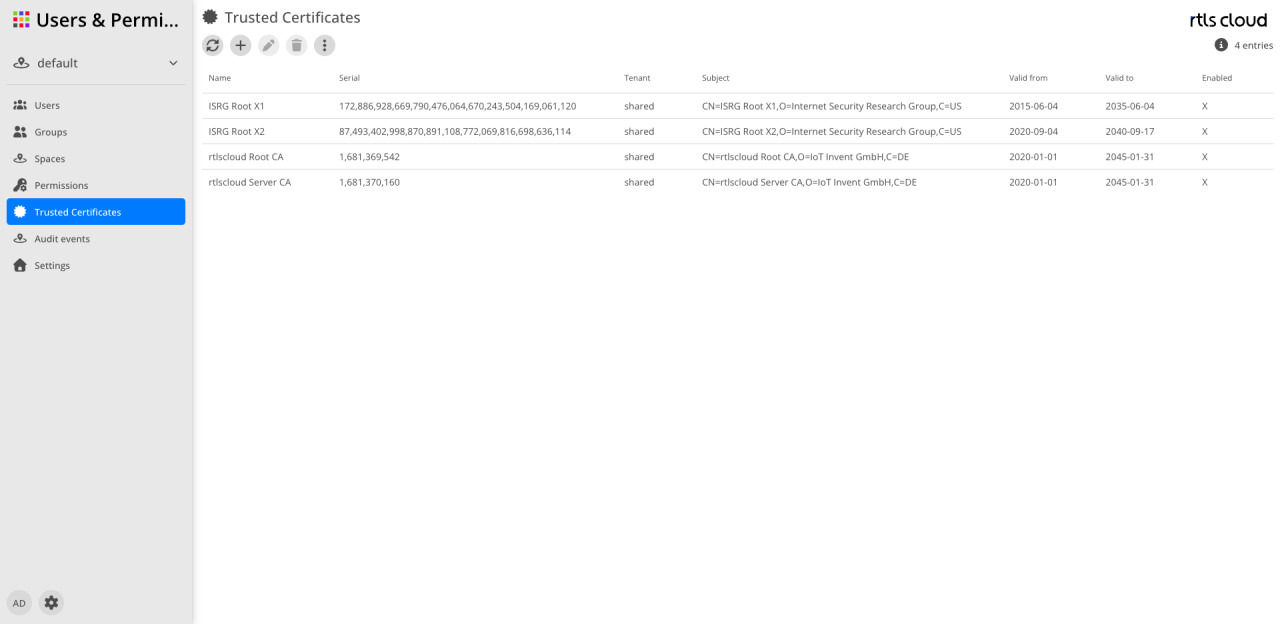
The user interface is used for the control and lifecycle management of the stored security certificates.
Action bar
Certificates can be managed via the icons in the toolbar:
| Action | Description |
|---|---|
|
Refreshes the display of the certificate list. |
|
Opens the dialog to import a new trusted certificate. |
|
Allows adjusting metadata of the selected certificate (enabled after selection). |
|
Removes the selected certificate from the trust store (enabled after selection). |
|
Provides additional functions, such as exporting certificate details. |


| Pay special attention to the Valid until column to ensure that expiring certificates are renewed in time and communication is not interrupted. |
Columns
The table provides information about the identity and the validity period of the trusted certificates.
| Column | Description |
|---|---|
Name |
The internal name of the certificate for easy identification. |
Serial number |
The unique identification number of the certificate assigned by the issuing authority (CA). |
Tenant |
Indicates whether the certificate is assigned to a specific tenant or is globally available as |
Subject |
The "Subject" entry of the certificate describing the identity of the owner (e.g. CN, O, C) in detail. |
Valid from |
The date from which the certificate is technically valid. |
Valid until |
The expiry date of the certificate. After this date, the certificate is considered invalid by the system. |
Enabled |
An |