Tags
Tag list
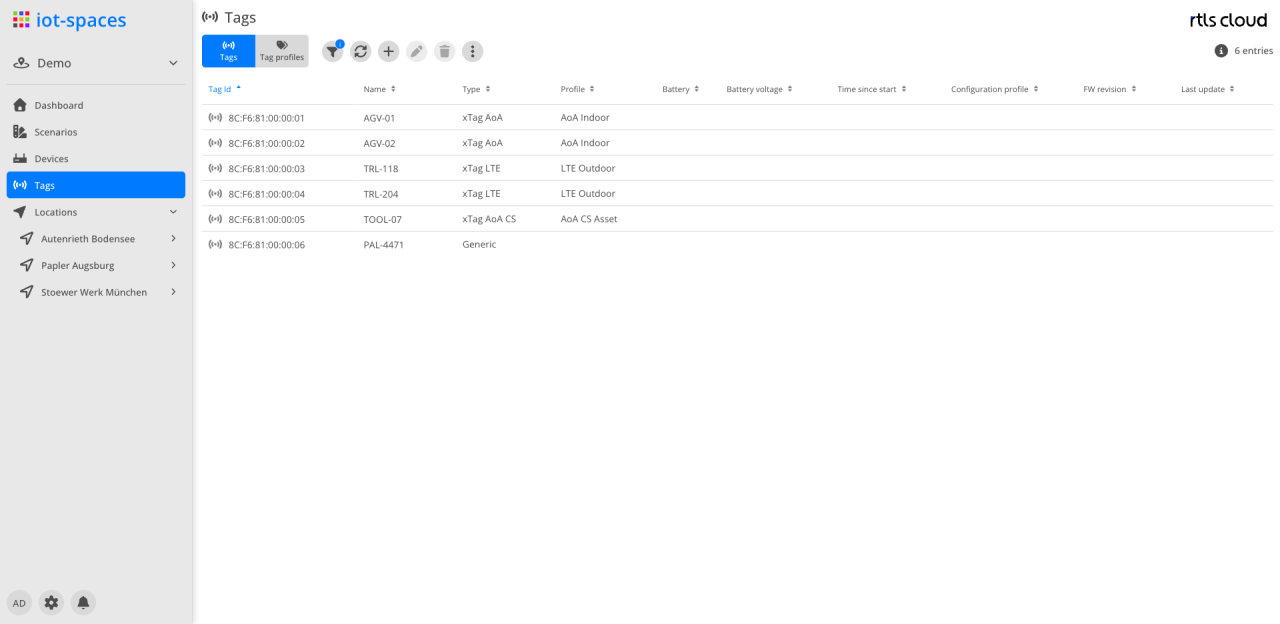
| Module | Description |
|---|---|
Filter |
Filter by tag properties and labels |
|
Refreshes the tag list |
|
Create a new tag |
|
Edit the selected tag |
|
Delete the selected tag |
Actions |
Further actions to choose from, among them the export of the list |


Actions in the context menu
The tag actions are in the context menu of the respective row and act on the selection:
| Action | Effect |
|---|---|
Assign tag profile |
Assigns a profile from the Tag profiles perspective to the selected tags |
Assign labels |
Sets the labels of the selected tags |
Activate / deactivate tag(s) |
Switches the tags active or inactive |
Debug |
Switches the tag’s debug feature on or off |
Trace |
Switches tracing within the debug feature on or off |
Decision |
Switches the recording of decisions within the debug feature on or off |
The tag type can only be changed with administration permission on the tenant.
Columns
| Field | Type | Description |
|---|---|---|
Tag Id |
Text |
Unique ID of the tag; the leading icon shows the state of the tag |
Name |
Text |
Name of the tag |
Type |
Text |
Tag type; the types are described under Types |
Profile |
Text |
Assigned tag profile |
Battery |
Icon |
Charge level of the battery |
Voltage |
Number |
Battery voltage |
Time since start |
Duration |
Uptime since the tag was last started |
Configuration profile |
Text |
Assigned configuration profile |
FW revision |
Text |
Firmware version of the tag |
Last update |
Timestamp |
Point in time of the tag’s last report |