Assets
Reference
| Module | Description |
|---|---|
|
Configured filters |
|
Refreshes the asset list |
|
Create asset |
|
Edit asset |
|
Delete asset |
|
Number of displayed assets |
|
Exports the asset list based on an export template (see Export templates) |
Import |
Imports assets from a file |
|
Asset list |



Context menu
The context menu (right-click on one or more selected assets) provides the following actions:
| Action | Description |
|---|---|
Add labels |
Assigns labels to the selected assets |
Remove labels |
Removes labels from the selected assets |
Tags |
Assigns tags to or removes them from the selected assets |
Set location |
Manually sets the current location of the selected assets |
Finish track |
Finishes the running track (cycle) of the selected assets |
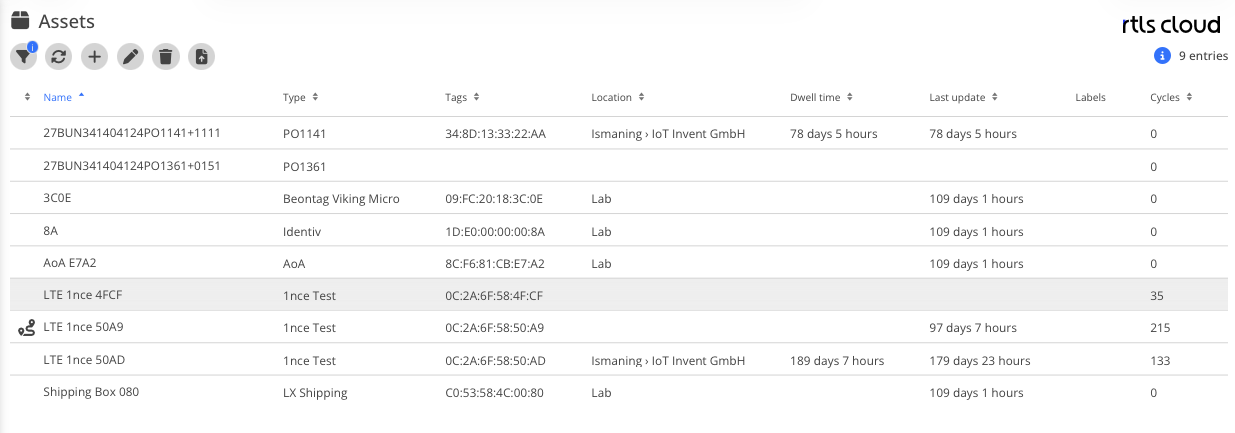
Asset List
This list displays all assets within a space along with general information.
Attributes
| Field | Type | Description |
|---|---|---|
Name |
Text |
Name of the asset |
Type |
DropDown |
Asset type |
Tags |
DropDown List |
Tags associated with the asset |
Location |
Location |
Current location |
Dwell time |
Duration |
Time the asset has spent in the current location |
Last update |
Timestamp |
Timestamp of the last received event |
Labels |
Label |
Configured label |
Cycles |
Counter |
Number of completed cycles |