Asset Types
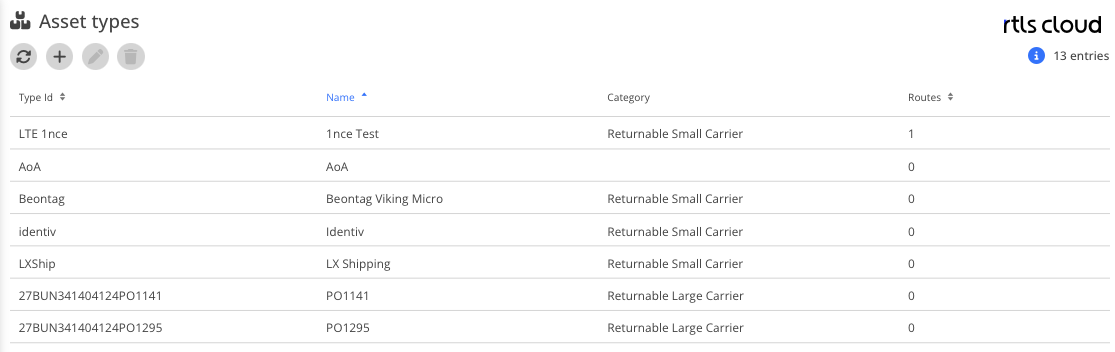
Reference
| Module | Description |
|---|---|
|
Refreshes the asset types list |
|
Create asset type |
|
Edit asset type |
|
Delete asset type |
|
Number of displayed asset types |
|
Asset types list |



Automatic Asset Assignment
When a tag reports in that is not assigned to any asset yet, the asset can be created automatically. One or more rules can be configured per asset type for this — in the asset type’s edit dialog, on the Automatic asset assignment tab.
Without a matching, enabled rule nothing happens: in a space where no asset type carries such a rule, no assets are created automatically, no matter how many positions arrive there.
|
The tag has to be known in the tag administration. A tag the locating hardware has never reported cannot be assigned. |
Attributes
| Field | Type | Description |
|---|---|---|
Enabled |
Toggle |
Only enabled rules are evaluated |
Tag property |
DropDown |
Which property of the tag is evaluated: Id (the technical identifier, for example the MAC address) or Name (the readable name from the tag administration) |
Tag prefix |
Text |
Mandatory. Only tags whose value starts with it are covered by this rule. A trailing |
Asset name mode |
DropDown |
How the asset name is derived from the value |
Separator |
Text |
Only visible for Part before the separator and Part after the separator, and mandatory there. The characters |
Example
Tag name 27B330061706540953+00005, tag prefix 27B330061706540953*, separator +:
| Asset name mode | Result |
|---|---|
Part after the separator |
|
Part before the separator |
|
Full tag property |
|
|
The separator is looked for from the start of the whole value, inside the prefix as well. For the MAC address |
How the assignment works
For every incoming position of a tag, in this order:
-
If the tag is already assigned to an asset, that asset is used. The rules are not evaluated at all.
-
Otherwise exactly one enabled rule across all asset types of the space has to match.
-
The asset name is derived from the tag.
-
If an asset of this asset type with this name already exists in the space, the tag is added to it. No second asset is created.
-
Only otherwise is a new asset created with this name and this asset type.
In addition:
-
The asset name is unique per asset type. The same name under a different asset type is a separate asset.
-
A tag is always assigned to at most one asset.
-
An incomplete rule — without a tag prefix, without a tag property or without an asset name mode — has no effect.
-
If the value yields no name, for instance because the separator is at the end, no asset is created.
|
Two rules that could claim the same tag cannot be saved. This is checked when the rule is entered and when the asset type is saved, across all asset types of the space in both cases. Rules overlap when they read the same tag property and one prefix starts with the other — |
|
If you work with application spaces (see Space type), the same tag becomes a separate asset in every application space. That is intended — every use case keeps its own inventory. |