Tags
|
A tag is not created — it appears. There is no step by which you create a tag. As soon as a device reports over the cellular network for the first time, its record comes into existence automatically, initially in the default tenant. Only afterwards is it assigned to a tenant and a group. An empty tag list therefore means either that no device has reported yet, or that the devices that did have not been assigned to a tenant. You can see the latter in Tags (Administration). |
Reference
| Module | Description |
|---|---|
|
Reloads the list |
|
Narrows the list by tag id or name, group and labels |
|
Creates a tag manually. Not normally needed — see the note above |
|
Opens the selected tag for editing |
|
Removes the record. If the device reports again, it is recreated |
|
Exports the list as CSV |
|
Number of tags shown. At most 1000 are loaded |
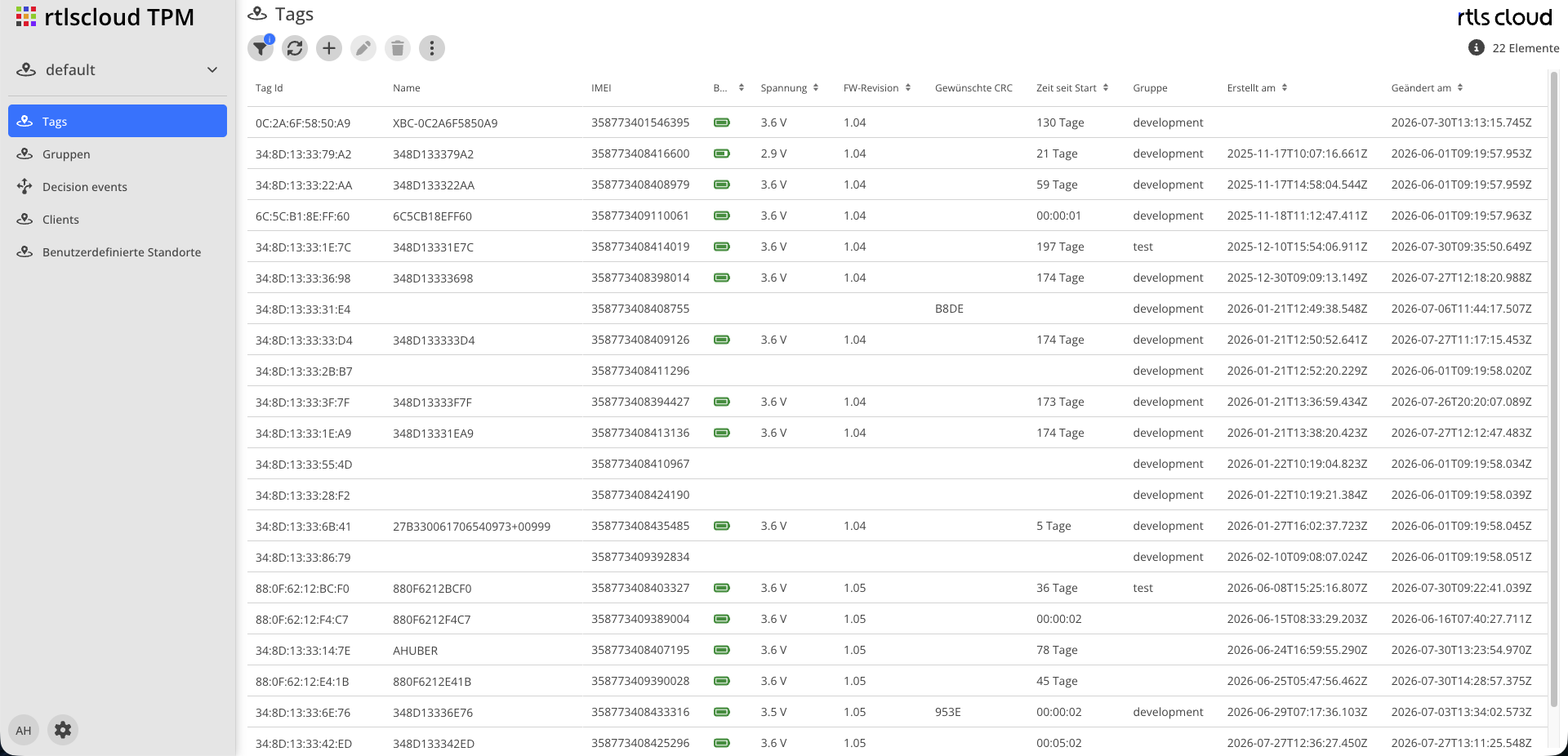
Tag list |
A double click opens the tag in a read-only view |


Attributes
| Field | Type | Description |
|---|---|---|
Tag Id |
Text |
The MAC address of the device and thereby its unique key. Never changed |
Name |
Text |
Display name. Without one the tag id is shown. If the device reports a name of its own, that name is adopted |
Type |
Selection |
Device type. Currently there is only a single, generic type |
Group |
Selection |
The tag’s group. It decides which credentials receive its events — see Clients |
Tenant |
Selection |
The tenant the tag belongs to |
Active |
Yes/No |
When set to No, events from the device are rejected and not processed |
IMEI |
Text |
Identity of the cellular hardware. Taken from the message |
Battery |
Number |
Last reported charge level |
Voltage |
Number |
Last reported battery voltage |
FW revision |
Text |
Firmware version the device reported |
Desired CRC |
Text |
Checksum of the configuration profile the device is meant to run. A lasting difference from the reported one means the device has not applied the profile |
Time since start |
Number |
How long the device has been running since its last restart |
Created at |
Timestamp |
When the device reported for the first time |
Modified at |
Timestamp |
When the record was last changed — including by an incoming message |
Context Menu
| Action | Description |
|---|---|
Assign new Tenant |
Moves the tag together with its history to another tenant. The usual way of putting a newly appeared device into service |
Assign new Group |
Assigns the tag to a group and thereby decides which credentials see its events |
Both actions apply to the selection in the list and check for each tag individually whether you are allowed to change it.
Filter
| Filter | Description |
|---|---|
Search |
Finds tags by tag id or name |
Groups |
Restricts the list to one or more groups |
Labels |
Restricts the list to assigned labels |
Export
The export produces a CSV file with the master data and the whole reported telemetry — among it the counters for advertising reasons, WiFi scans and cellular transmissions as well as hardware and firmware identification and the last reset reason.
What is exported is what the filter leaves, not the entire database.